> ## Documentation Index
> Fetch the complete documentation index at: https://docs-staging-actions-triggers-prototype.mintlify.site/llms.txt
> Use this file to discover all available pages before exploring further.
> Describes how to install the Auth0 Authorization Extension.
# Install Authorization Extension
Auth0 provides two ways to implement role-based access control (RBAC), which you can use in place of or in combination with your API's own internal access control system:
* [Authorization Core](/docs/manage-users/access-control/rbac)
* [Authorization Extension](/docs/customize/extensions/authorization-extension)
The Authorization Core feature set matches the functionality of the Authorization Extension, improves performance and scalability, and provides a more flexible RBAC system than the Authorization Extension.
Currently, both implement the key features of RBAC and allow you to restrict the custom scopes defined for an API to those that have been assigned to the user as permissions.
## Prerequisite
Before you begin, make sure that you have an existing application that can be used with the Authorization Extension. You can use the following types of applications:
* Native apps
* Regular web apps
* Single-page apps
Applications without an assigned type or machine-to-machine apps cannot be used with this extension.
## Install extension
1. Go to [Auth0 Dashboard > Extensions](https://manage.auth0.com/#/extensions).
2. Select **Auth0 Authorization** and answer the prompt to install.
3. Choose where you would like to store your data: Webtask Storage or Amazon S3 bucket.
Once the extension is installed, you will see it listed under the **Installed Extensions**.
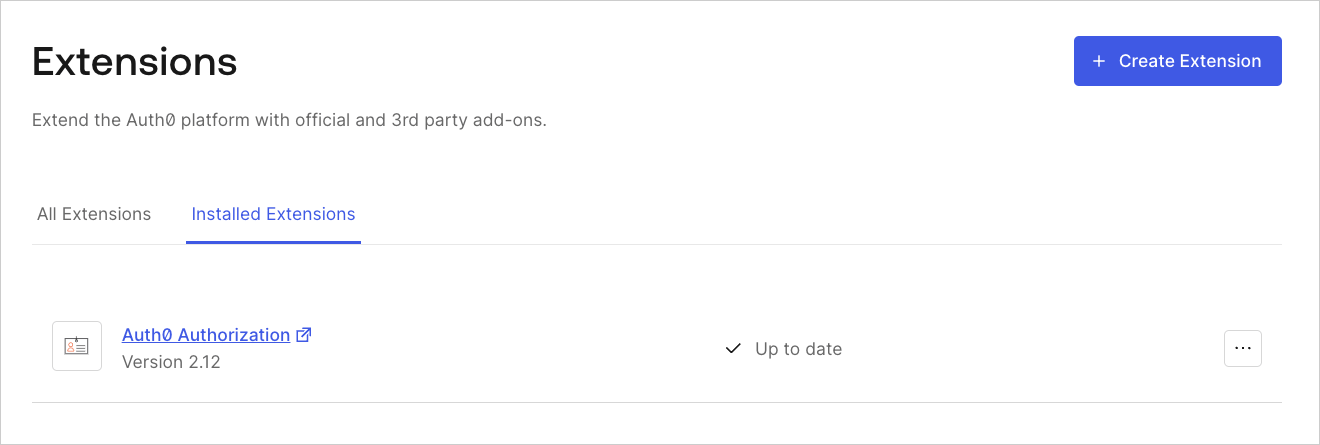 Installing this extension creates an auth0-authz application for your account. **Do not edit or delete this application!** If you uninstall the extension at a later date, this application will be deleted automatically.
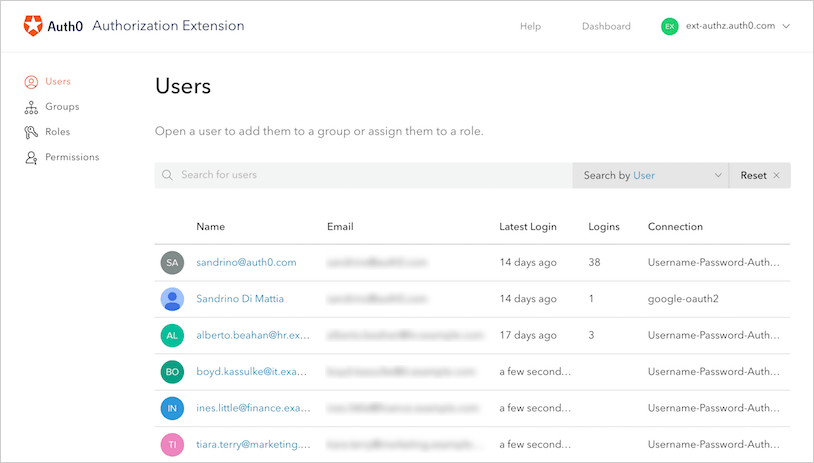
When you click the link to open the extension for the first time, you will be asked to provide permission for the extension to access your Auth0 account. If you do, you will be taken to the Authorization Dashboard.
Installing this extension creates an auth0-authz application for your account. **Do not edit or delete this application!** If you uninstall the extension at a later date, this application will be deleted automatically.
When you click the link to open the extension for the first time, you will be asked to provide permission for the extension to access your Auth0 account. If you do, you will be taken to the Authorization Dashboard.
 ### Webtask storage
The extension will use Webtask Storage by default, and you are limited to 500 KB of data. This is equivalent to:
* 1000 groups and 3000 users, where each user is a member of 3 groups
* 20 groups and 7000 users, where each user is a member of 3 groups
### Amazon S3
Alternatively, you can use Amazon S3 as a storage provider. Amazon S3 is a file-based storage platform, which means it writes in parallel. This may cause issues, but the extension's storage logic attempts to take this into account. However, if you automate the creation of groups, roles, or permissions, Auth0 recommends that you use sequential calls to the API.
This extension has limitations in terms of performance and is not meant to be used with large data sets. Before you choose Amazon S3 for data storage, we recommend that you test and see how it performs for your case. Performance degradation is also a possibility as more data is added to S3.
To use Amazon S3, you need to:
1. Create an S3 bucket.
2. Create an IAM user and get the Key ID for that user.
3. Create a policy for the IAM user that allows the user to make changes to the bucket.
```json lines expandable theme={null}
{
"Version": "2012-10-17",
"Statement": [
{
"Effect": "Allow",
"Action": [
"s3:DeleteObject",
"s3:GetObject",
"s3:ListBucket",
"s3:PutObject"
],
"Resource": [
"arn:aws:s3:::{nameOfYourBucket}/*"
]
},
{
"Effect": "Allow",
"Action": [
"s3:ListBucket"
],
"Resource": [
"arn:aws:s3:::{nameOfYourBucket}"
],
"Condition": {}
}
]
}
```
## Learn more
* [Configure Authorization Extension](/docs/customize/extensions/authorization-extension/configure-authorization-extension)
* [Set Up Users in Authorization Extension Dashboard](/docs/customize/extensions/authorization-extension/set-up-authorization-extension-users)
* [Enable API Access to Authorization Extension](/docs/customize/extensions/authorization-extension/enable-api-access-to-authorization-extension)
* [Import and Export Authorization Extension Data](/docs/customize/extensions/authorization-extension/import-and-export-authorization-extension-data)
### Webtask storage
The extension will use Webtask Storage by default, and you are limited to 500 KB of data. This is equivalent to:
* 1000 groups and 3000 users, where each user is a member of 3 groups
* 20 groups and 7000 users, where each user is a member of 3 groups
### Amazon S3
Alternatively, you can use Amazon S3 as a storage provider. Amazon S3 is a file-based storage platform, which means it writes in parallel. This may cause issues, but the extension's storage logic attempts to take this into account. However, if you automate the creation of groups, roles, or permissions, Auth0 recommends that you use sequential calls to the API.
This extension has limitations in terms of performance and is not meant to be used with large data sets. Before you choose Amazon S3 for data storage, we recommend that you test and see how it performs for your case. Performance degradation is also a possibility as more data is added to S3.
To use Amazon S3, you need to:
1. Create an S3 bucket.
2. Create an IAM user and get the Key ID for that user.
3. Create a policy for the IAM user that allows the user to make changes to the bucket.
```json lines expandable theme={null}
{
"Version": "2012-10-17",
"Statement": [
{
"Effect": "Allow",
"Action": [
"s3:DeleteObject",
"s3:GetObject",
"s3:ListBucket",
"s3:PutObject"
],
"Resource": [
"arn:aws:s3:::{nameOfYourBucket}/*"
]
},
{
"Effect": "Allow",
"Action": [
"s3:ListBucket"
],
"Resource": [
"arn:aws:s3:::{nameOfYourBucket}"
],
"Condition": {}
}
]
}
```
## Learn more
* [Configure Authorization Extension](/docs/customize/extensions/authorization-extension/configure-authorization-extension)
* [Set Up Users in Authorization Extension Dashboard](/docs/customize/extensions/authorization-extension/set-up-authorization-extension-users)
* [Enable API Access to Authorization Extension](/docs/customize/extensions/authorization-extension/enable-api-access-to-authorization-extension)
* [Import and Export Authorization Extension Data](/docs/customize/extensions/authorization-extension/import-and-export-authorization-extension-data)