> ## Documentation Index
> Fetch the complete documentation index at: https://docs-staging-actions-triggers-prototype.mintlify.site/llms.txt
> Use this file to discover all available pages before exploring further.
> Describes how Auth0 Teams allows you to manage tenants and tenant administrators.
# Auth0 Teams
Auth0 Teams provides a single point of visibility and control over your Auth0 resources by providing centralized governance, compliance, and secure collaboration at scale. Teams membership sits on top of the tenant membership account.
The main team member role is referred to as the Team Owner and has visibility into all tenants within their Auth0 Account. As an Auth0 Team Owner, you can manage a single tenant or multiple tenants.
The following features are currently available as part of Auth0 Teams:
* Visibility and control of Teams members
* Visibility into Tenants with relevant details
* Visibility and control of Tenant members
* Ability to enforce Single Sign-On with your own Identity provider
* Ability to restrict tenant creation
* Ability to manage subscription and billing details for self-service subscriptions
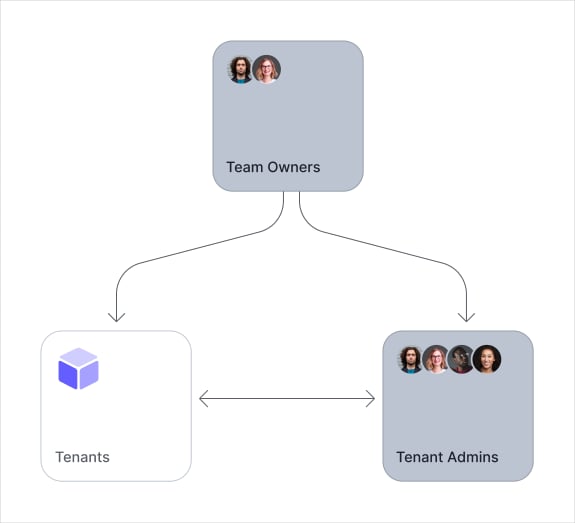 Auth0 Teams currently supports a single Teams instance for all tenants attached to either your subscription or Enterprise contract.
Team Owners manage and configure the tenants and tenant administrators within the Teams instance.
## Getting Started
Auth0 Teams is on by default for new self-service users since 1 November 2023.
Existing Public and Private Cloud Enterprise customers can request to be onboarded into Teams through their Technical Account Manager, Sales Executive, or open a ticket with [Auth0 Support](https://support.auth0.com).
For all other subscription types, if you joined Auth0 prior to 1 November 2023, you need to upgrade your plan to the latest version in your tenant's [subscription settings](https://manage.auth0.com/#/tenant/billing/subscription) to have Teams automatically provisioned for you.
## Feature Support Matrix
Features marked with an asterisk are currently in beta for Private Cloud customers.
| Teams Feature | Enterprise Private Cloud | Enterprise Public Cloud | Self-Service Subscription |
| -------------------------- | ------------------------ | ----------------------- | ------------------------- |
| Tenant Management | ✅ | ✅ | ✅ |
| Tenant Member Management | ✅ \* | ✅ | ✅ |
| SSO Enforcement | ✅ \* | ✅ | ❌ |
| Tenant Creation from Teams | ✅ | ❌ | ✅ |
Auth0 Teams currently supports a single Teams instance for all tenants attached to either your subscription or Enterprise contract.
Team Owners manage and configure the tenants and tenant administrators within the Teams instance.
## Getting Started
Auth0 Teams is on by default for new self-service users since 1 November 2023.
Existing Public and Private Cloud Enterprise customers can request to be onboarded into Teams through their Technical Account Manager, Sales Executive, or open a ticket with [Auth0 Support](https://support.auth0.com).
For all other subscription types, if you joined Auth0 prior to 1 November 2023, you need to upgrade your plan to the latest version in your tenant's [subscription settings](https://manage.auth0.com/#/tenant/billing/subscription) to have Teams automatically provisioned for you.
## Feature Support Matrix
Features marked with an asterisk are currently in beta for Private Cloud customers.
| Teams Feature | Enterprise Private Cloud | Enterprise Public Cloud | Self-Service Subscription |
| -------------------------- | ------------------------ | ----------------------- | ------------------------- |
| Tenant Management | ✅ | ✅ | ✅ |
| Tenant Member Management | ✅ \* | ✅ | ✅ |
| SSO Enforcement | ✅ \* | ✅ | ❌ |
| Tenant Creation from Teams | ✅ | ❌ | ✅ |